
What is an Orphan Process, and How Do I Handle It?
Posted by Admin on February 16, 2026
In the world of computer systems and programming, a common term you might come across is an orphan process. This refers to a process that continues running even after its parent process has terminated or been killed. While it might sound technical, it is important to understand orphan processes because they can have significant implications on system performance and resource management.
In this blog, we'll break down what an orphan process is, why it occurs, how to handle it, and best practices to ensure it doesn't disrupt the stability of your system.
What is an Orphan Process?
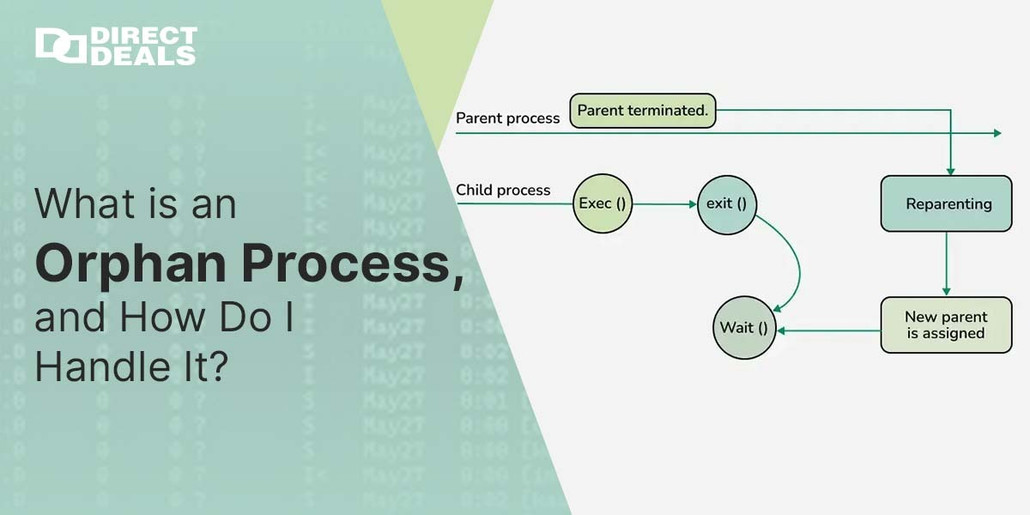
An orphan process is a process in an operating system that was created by a parent process, but the parent process terminates before the child process does. This leaves the child process without a parent to manage or monitor it. As a result, the child process becomes "orphaned."
Orphan processes do not have a controlling terminal, and they are re parented to a special system process, usually the init process (in Unix based systems) or the System Idle Process (in Windows systems), which will monitor and eventually clean up the orphaned processes.
Causes of Orphan Processes:
Parent Process Termination:
This happens when the parent process is forcefully killed or exits unexpectedly.
Incorrect Termination of Parent Process:
If the parent does not clean up its child processes properly, they can become orphaned.
System Crashes or Bugs:
In some cases, system errors or bugs can cause processes to lose their parent child relationship.
How Do I Handle Orphan Processes?
While orphan processes do not typically cause immediate harm, they can lead to resource wastage, especially in systems running numerous processes. Here are steps you can take to handle orphan processes effectively:
Monitor and Identify Orphan Processes:
Regularly monitor running processes using system tools like Task Manager (Windows), top or ps commands (Linux/Unix).
Identify orphan processes by looking for processes with no associated parent process.
Use System Monitoring Tools:
Tools like htop on Linux can help you identify orphan processes and show how long they’ve been running.
On Windows, you can use Process Explorer from Sysinternals to detect orphan processes and track their parent child relationships.
Reap Orphan Processes:
If an orphan process is running for an extended period, you can manually terminate it using kill (Linux/Unix) or Task Manager (Windows).
In Unix like systems, orphan processes are automatically handled by the init process, but if you need to manually intervene, you can reassign the process or kill it.
Automatic Cleanup Mechanisms:
In Linux systems, orphan processes are automatically re parented to the init process, which will clean them up once they are no longer needed.
Ensure your system has proper cleanup procedures in place to handle orphan processes, such as configuring cron jobs or systemd timers to periodically clean up idle processes.
Ensure Proper Parent Child Management:
To prevent orphan processes from occurring in the first place, ensure that parent processes are designed to properly handle child processes, including catching errors and terminating child processes when they finish their task.
Conclusion
Orphan processes, while not always harmful, can lead to unnecessary resource consumption and system clutter. By understanding their behavior and taking steps to identify and manage orphaned processes, you can keep your system running smoothly. Remember, regular monitoring and proper process management practices are key to preventing and handling orphan processes effectively.
At DirectDeals, we’ve been providing solutions with 27+ years of trust in the industry, ensuring that your systems and software are optimized for performance and reliability. Whether you need advice on system management or support with handling technical challenges, we’re here to help.
For further assistance or more information, feel free to contact us directly:
Contact Details:
Phone: +800-983-2471
Email: support@directdeals.com
Stay ahead in the tech world with DirectDeals your trusted for 27+ years!